nicktrunkey@me.com
↗
(206) 396-9743
↗
↗
Here is some of my work


Project: Contact Details Ehancements
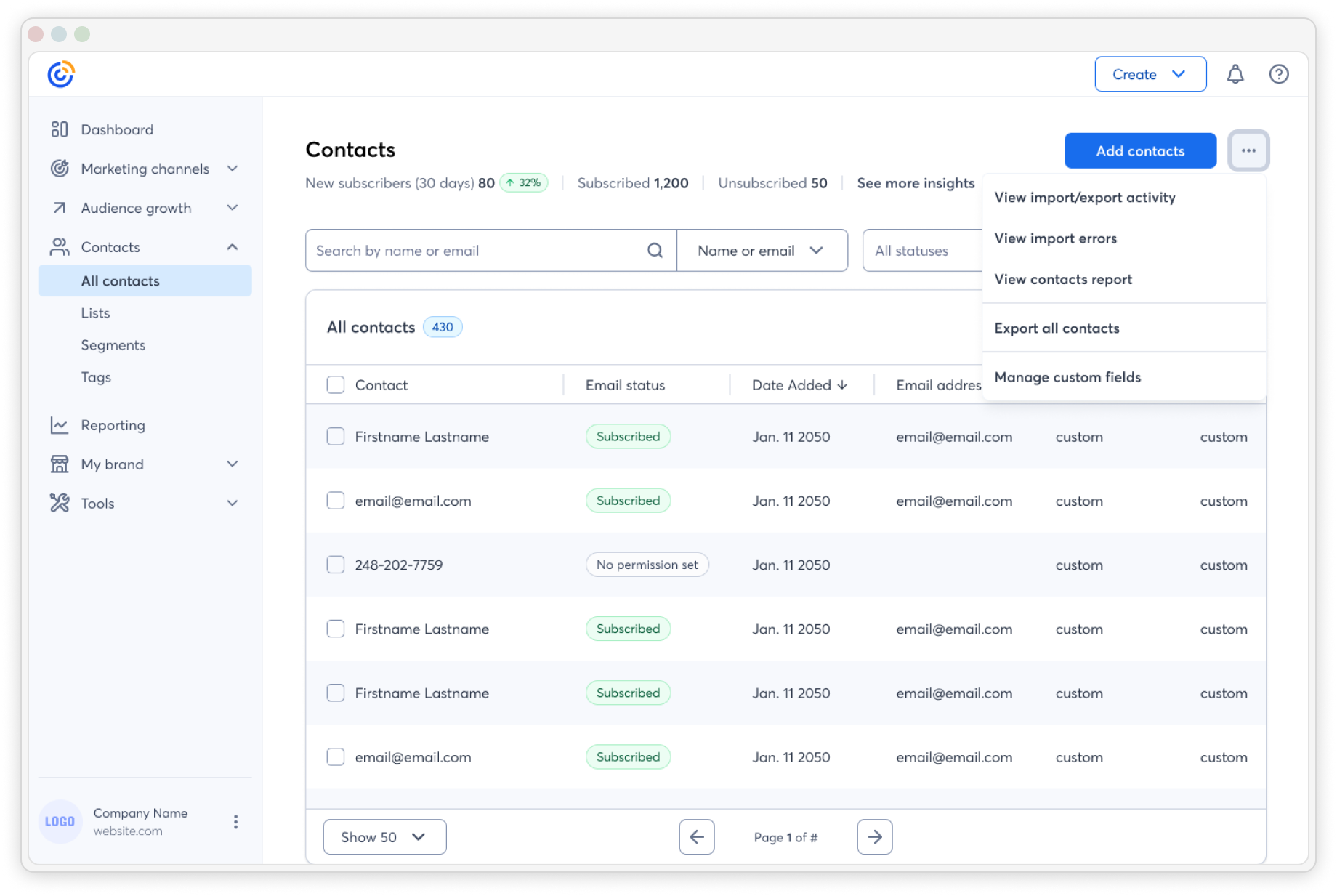
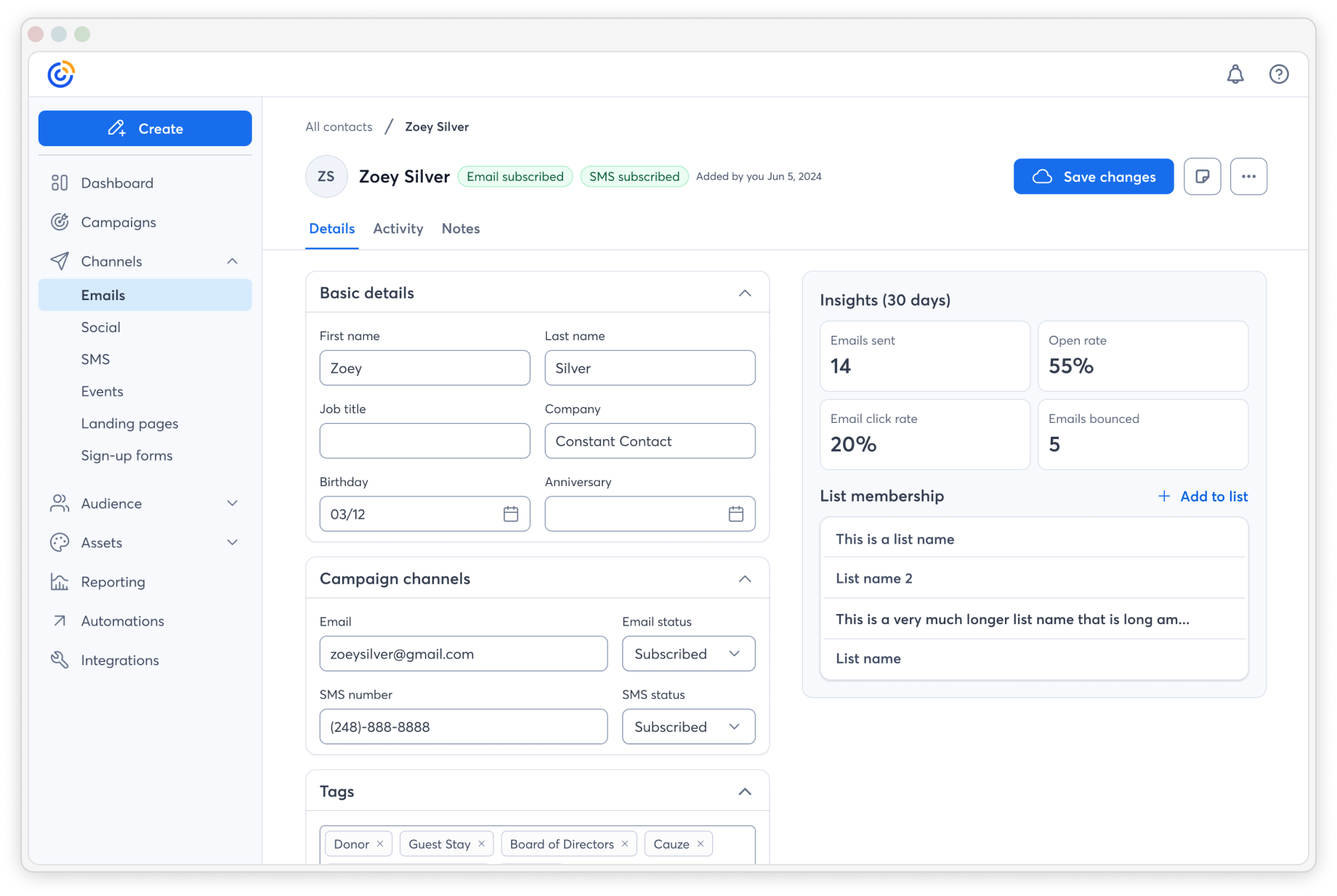
I began this project by identifying opportunities for improvement in the Contact Details experience using AI-driven insights combined with behavioral data. I uncovered pain points where users struggled to effectively manage or grow their contact lists. Click-rate data and engagement metrics revealed where customers were bailing versus saving contacts, giving us a data-backed view of user friction.
To better understand how to evolve the product, I conducted a competitive analysis examining how other platforms tackled similar CRM challenges. The insights pointed clearly toward the need for more CRM-like functionality — customers wanted smarter ways to manage their contacts, segment audiences, and identify list growth opportunities. I translated these findings into design proposals tied to measurable KPIs, including potential revenue growth for each new or modified feature.

Before


After
Project background: Custom Fields Expansion
Following the discovery phase, the business prioritized feature parity with competitors — a goal that aligned perfectly with our earlier findings around CRM-style enhancements. I took the lead in evolving our existing Custom Fields feature, building on its foundation to introduce new functionality while keeping the interface approachable for all user types, especially those with less technical experience.
To ensure the new experience was both intuitive and valuable, I ran A/B tests and customer interviews to validate assumptions about usability and adoption. Every iteration focused on minimizing friction and maintaining clarity. The result was a more flexible, user-friendly system that empowered customers to better organize and personalize their contact data, ultimately strengthening their engagement and retention capabilities.

Cross-Functional Collaboration
Throughout the project, I worked closely with the Contacts Product Manager and Engineering Managers to align design goals with business objectives and technical realities. Together with the PM, I identified gaps in the current experience and areas for opportunity, translating those insights into actionable design updates. Once leadership approved the designs, they were handed off for engineering grooming.
Designs frequently required adjustments to fit our tech stack, so I participated in review sessions to refine screens until engineering sign-off. I also joined grooming sessions to provide clarity on interaction details and user flows. Beyond design, I contributed to QA testing to help identify and resolve visual or functional defects early in the development process — ensuring that the final product met both design intent and technical feasibility.

Design Process & Workflow
My design approach typically operates in two distinct modes: redesigns and new features. For redesigns, I focus heavily on gathering user feedback and understanding the “why” behind existing behaviors. For new features, my process starts with exploratory customer interviews and competitive research to uncover unmet needs. Once I have clarity on the “why,” I shift into defining the “how.”
I begin by creating low-fidelity wireframes — often generated with the help of AI tools like Figma Make for simple screens, and manually designed ones for complex interactions such as sorting or view options in dense data tables. After review cycles with design leadership and PMs, I refine the concepts using our design system, reusing existing components wherever possible. When new components are needed, I collaborate closely with the design system team and submit proposals for addition.
Maintaining organized design files was essential for efficiency and collaboration. I kept separate Figma files — one private space for design leadership and PM exploration, and a clean, dedicated file for engineering with only approved mockups. This minimized confusion from comments or outdated explorations. For responsive consistency, I structured screens from large (desktop) to small (mobile), documenting specific interactions such as sticky scrolling and component variations. This organization helped the broader team easily understand behavior across devices and ensured smooth handoff to development.


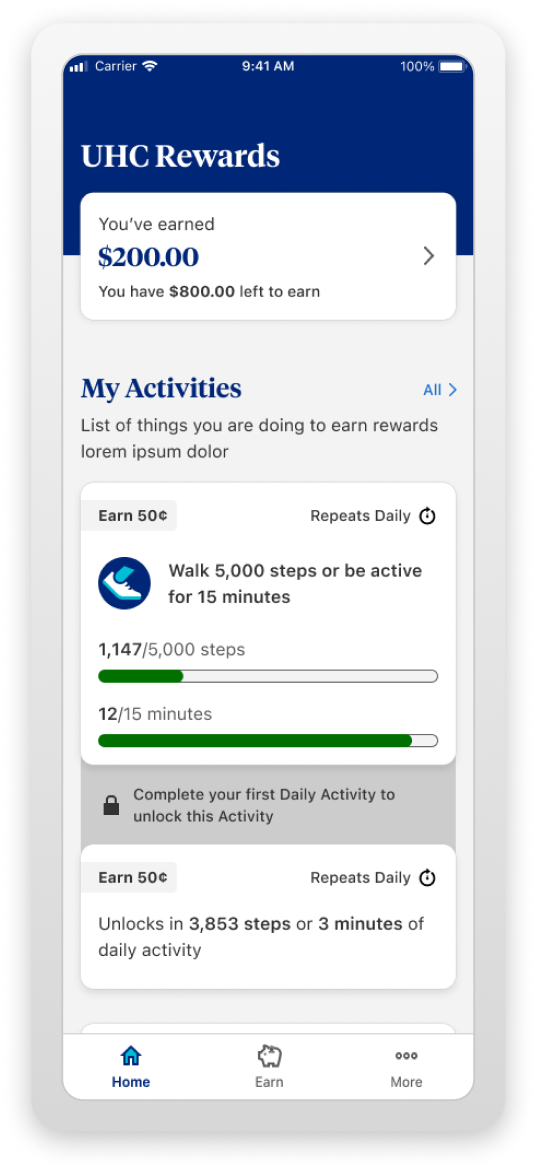
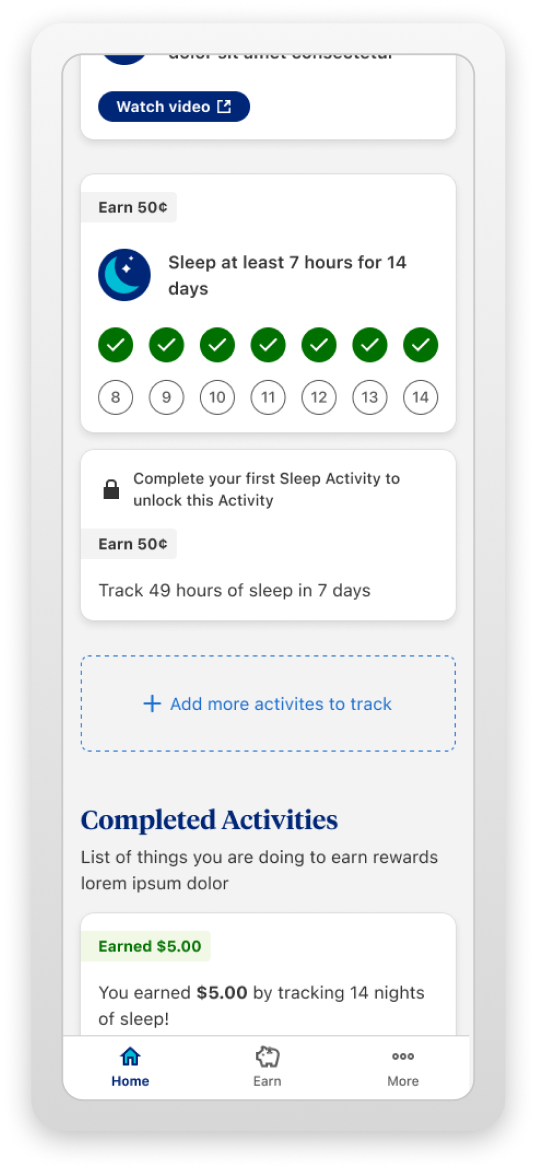
The UHC Rewards App is a mobile application that aims to motivate and reward users for engaging in healthy behaviors. The app was designed following a user-centered approach, which involved several stages of research, ideation, prototyping, testing and evaluation.
I conducted interviews, surveys and observations with potential users, and stakeholders to gather insights and identify opportunities for growth. I also performed a competitive analysis to benchmark other rewards experiences from retail stores and restaurants to best understand their strengths and weaknesses.
I tested and evaluated designs with real users, to validate the team’s assumptions and to collect feedback. I conducted A/B testing where we showed users two potential designs with a prompt, and asked them which design they felt best fit any given statement. We also used questionnaires and interviews to measure user satisfaction, engagement and motivation.
I had designs approved by key stakeholders. This included VPs, marketing representatives, and an accessibility group known as the "A11y" team. Designs went through each required group and made necessary adjustments to them as final feedback filtered in, eventually landing on the set of designs that would be then delivered to the engineering team for development.


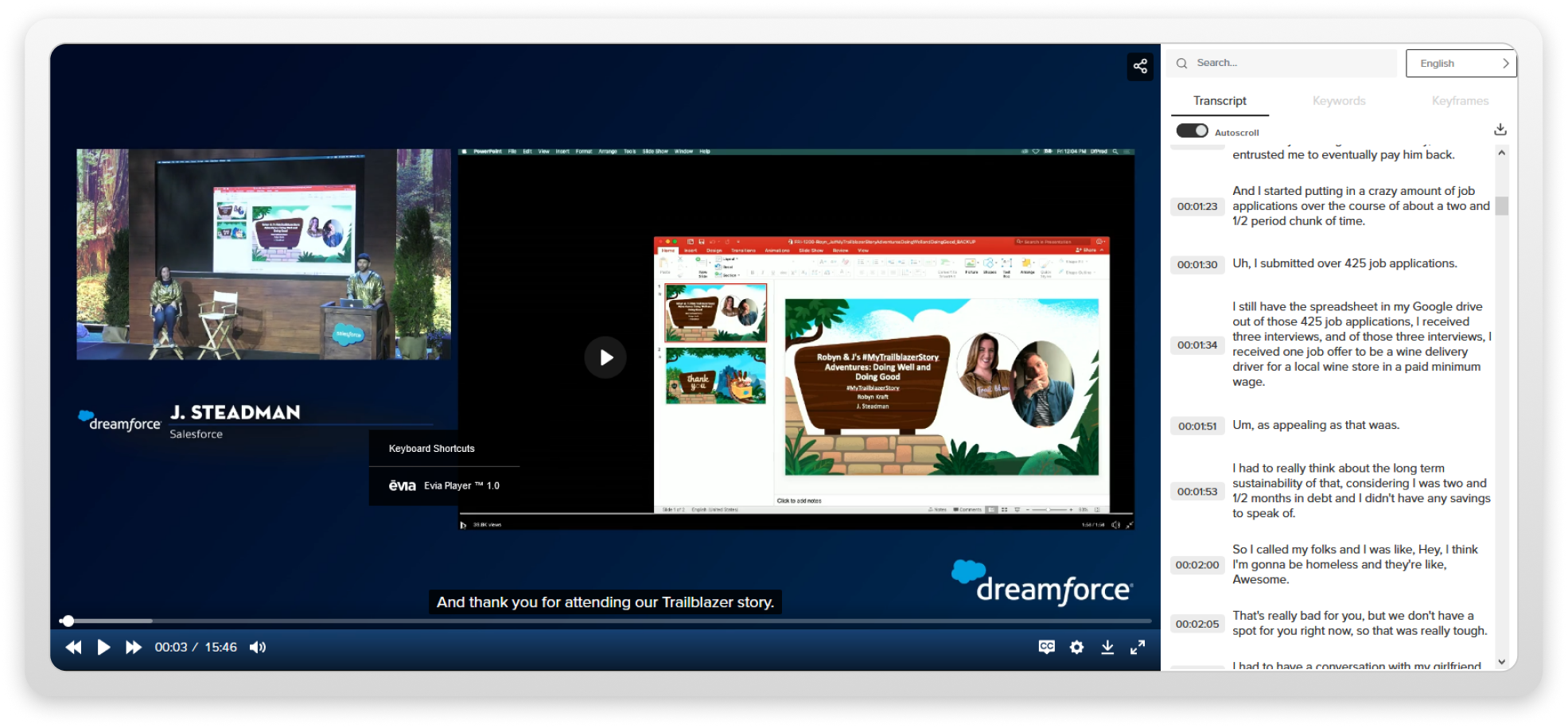
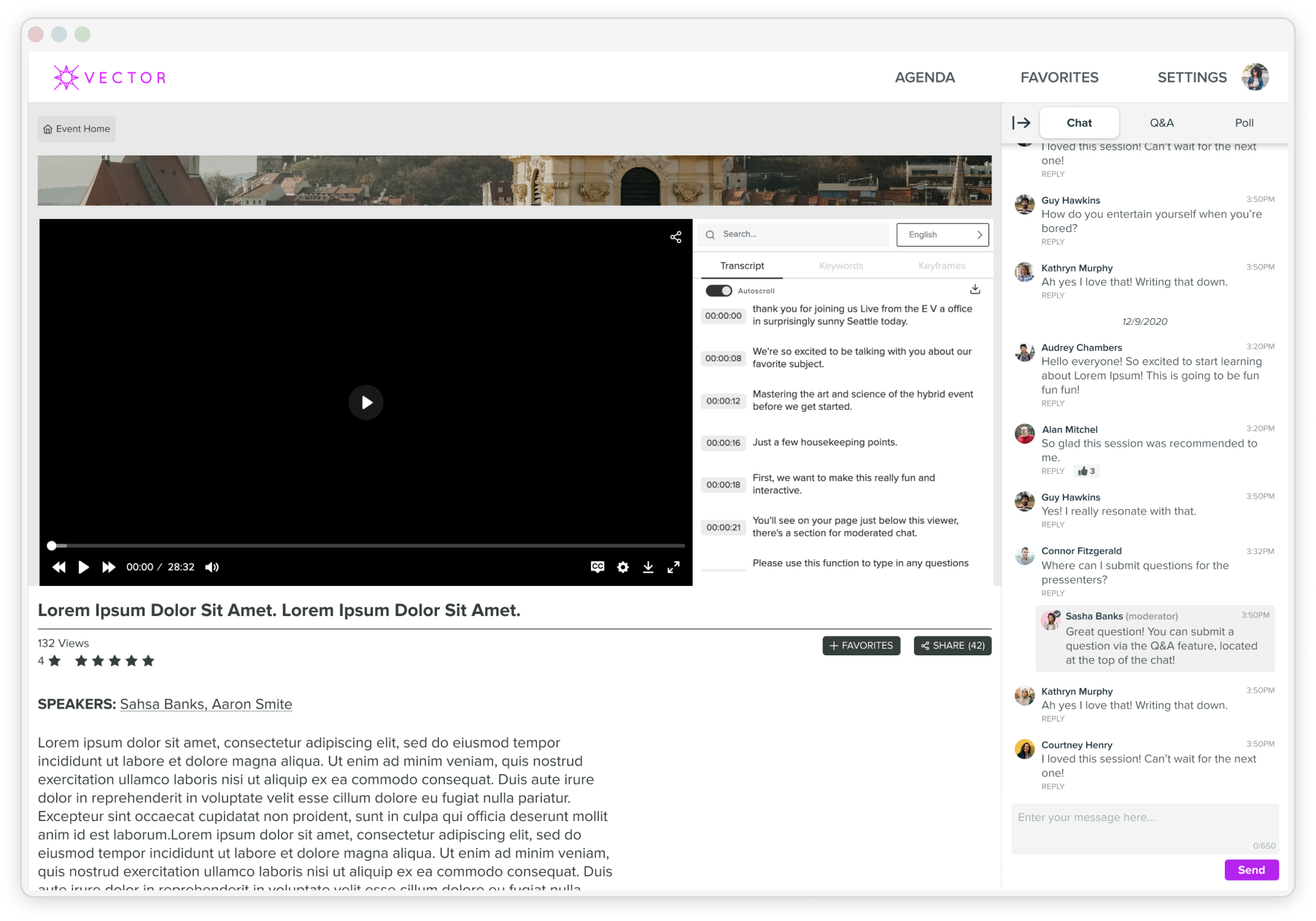
First I set off to understand the needs, preferences, and goals of the target users. I conducted interviews with key representatives of Vanguard Charitable to better understand their donors and what kinds of requirements we would need to follow when designing the ideal “charitable givings” experience. While this covered what the users should experience while on the site, there was also the additional hurdle of designing within the constrains of Salesforce Experience Cloud. To design efficiently I partnered with a Salesforce engineer which allowed us to avoid any major problems when it came to the delivery stage of the project.
I reviewed other Vanguard Charitable experiences and other charitable giving solution's digital apps and websites. Understanding their strengths and weaknesses was key for the team, as we then knew what the core features the designs needed, and what we could leave behind to keep the scope as minimal as possible given this was an MVP experience.
Since we were unable to test these designs with real Vanguard Charitable donors, we had members of the sales teams that knew their donors best test our designs. I created a series of A/B testing, identifying which designs felt easiest to use and understand, while also providing the ideal amount of control and fine tuning for the donor's charitable givings.


nicktrunkey@me.com
↗
(206) 396-9743
↗
↗
I’m a product designer who crafts thoughtful, accessible digital experiences that balance user needs with business goals. With experience at Constant Contact and Slalom, I’ve designed end-to-end solutions, built design systems, and shipped impactful features that drive growth and retention. I love solving complex problems, collaborating across teams, and turning ideas into intuitive, beautiful products.
I take a holistic approach to design, taking the time to understand the bigger picture before crafting solutions that connect every detail with the overall vision.
nicktrunkey@me.com
↗
(206) 396-9743
↗
↗
Here is some of my work


Project: Contact Details Ehancements
I began this project by identifying opportunities for improvement in the Contact Details experience using AI-driven insights combined with behavioral data. I uncovered pain points where users struggled to effectively manage or grow their contact lists. Click-rate data and engagement metrics revealed where customers were bailing versus saving contacts, giving us a data-backed view of user friction.
To better understand how to evolve the product, I conducted a competitive analysis examining how other platforms tackled similar CRM challenges. The insights pointed clearly toward the need for more CRM-like functionality — customers wanted smarter ways to manage their contacts, segment audiences, and identify list growth opportunities. I translated these findings into design proposals tied to measurable KPIs, including potential revenue growth for each new or modified feature.

Before


After
Project background: Custom Fields Expansion
Following the discovery phase, the business prioritized feature parity with competitors — a goal that aligned perfectly with our earlier findings around CRM-style enhancements. I took the lead in evolving our existing Custom Fields feature, building on its foundation to introduce new functionality while keeping the interface approachable for all user types, especially those with less technical experience.
To ensure the new experience was both intuitive and valuable, I ran A/B tests and customer interviews to validate assumptions about usability and adoption. Every iteration focused on minimizing friction and maintaining clarity. The result was a more flexible, user-friendly system that empowered customers to better organize and personalize their contact data, ultimately strengthening their engagement and retention capabilities.

Cross-Functional Collaboration
Throughout the project, I worked closely with the Contacts Product Manager and Engineering Managers to align design goals with business objectives and technical realities. Together with the PM, I identified gaps in the current experience and areas for opportunity, translating those insights into actionable design updates. Once leadership approved the designs, they were handed off for engineering grooming.
Designs frequently required adjustments to fit our tech stack, so I participated in review sessions to refine screens until engineering sign-off. I also joined grooming sessions to provide clarity on interaction details and user flows. Beyond design, I contributed to QA testing to help identify and resolve visual or functional defects early in the development process — ensuring that the final product met both design intent and technical feasibility.

Design Process & Workflow
My design approach typically operates in two distinct modes: redesigns and new features. For redesigns, I focus heavily on gathering user feedback and understanding the “why” behind existing behaviors. For new features, my process starts with exploratory customer interviews and competitive research to uncover unmet needs. Once I have clarity on the “why,” I shift into defining the “how.”
I begin by creating low-fidelity wireframes — often generated with the help of AI tools like Figma Make for simple screens, and manually designed ones for complex interactions such as sorting or view options in dense data tables. After review cycles with design leadership and PMs, I refine the concepts using our design system, reusing existing components wherever possible. When new components are needed, I collaborate closely with the design system team and submit proposals for addition.
Maintaining organized design files was essential for efficiency and collaboration. I kept separate Figma files — one private space for design leadership and PM exploration, and a clean, dedicated file for engineering with only approved mockups. This minimized confusion from comments or outdated explorations. For responsive consistency, I structured screens from large (desktop) to small (mobile), documenting specific interactions such as sticky scrolling and component variations. This organization helped the broader team easily understand behavior across devices and ensured smooth handoff to development.


The UHC Rewards App is a mobile application that aims to motivate and reward users for engaging in healthy behaviors. The app was designed following a user-centered approach, which involved several stages of research, ideation, prototyping, testing and evaluation.
I conducted interviews, surveys and observations with potential users, and stakeholders to gather insights and identify opportunities for growth. I also performed a competitive analysis to benchmark other rewards experiences from retail stores and restaurants to best understand their strengths and weaknesses.
I tested and evaluated designs with real users, to validate the team’s assumptions and to collect feedback. I conducted A/B testing where we showed users two potential designs with a prompt, and asked them which design they felt best fit any given statement. We also used questionnaires and interviews to measure user satisfaction, engagement and motivation.
I had designs approved by key stakeholders. This included VPs, marketing representatives, and an accessibility group known as the "A11y" team. Designs went through each required group and made necessary adjustments to them as final feedback filtered in, eventually landing on the set of designs that would be then delivered to the engineering team for development.


First I set off to understand the needs, preferences, and goals of the target users. I conducted interviews with key representatives of Vanguard Charitable to better understand their donors and what kinds of requirements we would need to follow when designing the ideal “charitable givings” experience. While this covered what the users should experience while on the site, there was also the additional hurdle of designing within the constrains of Salesforce Experience Cloud. To design efficiently I partnered with a Salesforce engineer which allowed us to avoid any major problems when it came to the delivery stage of the project.
I reviewed other Vanguard Charitable experiences and other charitable giving solution's digital apps and websites. Understanding their strengths and weaknesses was key for the team, as we then knew what the core features the designs needed, and what we could leave behind to keep the scope as minimal as possible given this was an MVP experience.
Since we were unable to test these designs with real Vanguard Charitable donors, we had members of the sales teams that knew their donors best test our designs. I created a series of A/B testing, identifying which designs felt easiest to use and understand, while also providing the ideal amount of control and fine tuning for the donor's charitable givings.


nicktrunkey@me.com
↗
(206) 396-9743
↗
↗
I’m a product designer who crafts thoughtful, accessible digital experiences that balance user needs with business goals. With experience at Constant Contact and Slalom, I’ve designed end-to-end solutions, built design systems, and shipped impactful features that drive growth and retention. I love solving complex problems, collaborating across teams, and turning ideas into intuitive, beautiful products.
I take a holistic approach to design, taking the time to understand the bigger picture before crafting solutions that connect every detail with the overall vision.
nicktrunkey@me.com
↗
(206) 396-9743
↗
↗
Here is some of my work


Project background: Contact Details Enhancements
I began this project by identifying opportunities for improvement in the Contact Details experience using AI-driven insights combined with behavioral data. I uncovered pain points where users struggled to effectively manage or grow their contact lists. Click-rate data and engagement metrics revealed where customers were bailing versus saving contacts, giving us a data-backed view of user friction.
To better understand how to evolve the product, I conducted a competitive analysis examining how other platforms tackled similar CRM challenges. The insights pointed clearly toward the need for more CRM-like functionality — customers wanted smarter ways to manage their contacts, segment audiences, and identify list growth opportunities. I translated these findings into design proposals tied to measurable KPIs, including potential revenue growth for each new or modified feature.

Before


After
Project background: Custom Fields Expansion
Following the discovery phase, the business prioritized feature parity with competitors — a goal that aligned perfectly with our earlier findings around CRM-style enhancements. I took the lead in evolving our existing Custom Fields feature, building on its foundation to introduce new functionality while keeping the interface approachable for all user types, especially those with less technical experience.
To ensure the new experience was both intuitive and valuable, I ran A/B tests and customer interviews to validate assumptions about usability and adoption. Every iteration focused on minimizing friction and maintaining clarity. The result was a more flexible, user-friendly system that empowered customers to better organize and personalize their contact data, ultimately strengthening their engagement and retention capabilities.

Cross-Functional Collaboration
Throughout the project, I worked closely with the Contacts Product Manager and Engineering Managers to align design goals with business objectives and technical realities. Together with the PM, I identified gaps in the current experience and areas for opportunity, translating those insights into actionable design updates. Once leadership approved the designs, they were handed off for engineering grooming.
Designs frequently required adjustments to fit our tech stack, so I participated in review sessions to refine screens until engineering sign-off. I also joined grooming sessions to provide clarity on interaction details and user flows. Beyond design, I contributed to QA testing to help identify and resolve visual or functional defects early in the development process — ensuring that the final product met both design intent and technical feasibility.

Design Process & Workflow
My design approach typically operates in two distinct modes: redesigns and new features. For redesigns, I focus heavily on gathering user feedback and understanding the “why” behind existing behaviors. For new features, my process starts with exploratory customer interviews and competitive research to uncover unmet needs. Once I have clarity on the “why,” I shift into defining the “how.”
I begin by creating low-fidelity wireframes — often generated with the help of AI tools like Figma Make for simple screens, and manually designed ones for complex interactions such as sorting or view options in dense data tables. After review cycles with design leadership and PMs, I refine the concepts using our design system, reusing existing components wherever possible. When new components are needed, I collaborate closely with the design system team and submit proposals for addition.
Maintaining organized design files was essential for efficiency and collaboration. I kept separate Figma files — one private space for design leadership and PM exploration, and a clean, dedicated file for engineering with only approved mockups. This minimized confusion from comments or outdated explorations. For responsive consistency, I structured screens from large (desktop) to small (mobile), documenting specific interactions such as sticky scrolling and component variations. This organization helped the broader team easily understand behavior across devices and ensured smooth handoff to development.


The UHC Rewards App is a mobile application that aims to motivate and reward users for engaging in healthy behaviors. The app was designed following a user-centered approach, which involved several stages of research, ideation, prototyping, testing and evaluation.
I conducted interviews, surveys and observations with potential users, and stakeholders to gather insights and identify opportunities for growth. I also performed a competitive analysis to benchmark other rewards experiences from retail stores and restaurants to best understand their strengths and weaknesses.
I tested and evaluated designs with real users, to validate the team’s assumptions and to collect feedback. I conducted A/B testing where we showed users two potential designs with a prompt, and asked them which design they felt best fit any given statement. We also used questionnaires and interviews to measure user satisfaction, engagement and motivation.
I had designs approved by key stakeholders. This included VPs, marketing representatives, and an accessibility group known as the "A11y" team. Designs went through each required group and made necessary adjustments to them as final feedback filtered in, eventually landing on the set of designs that would be then delivered to the engineering team for development.


First I set off to understand the needs, preferences, and goals of the target users. I conducted interviews with key representatives of Vanguard Charitable to better understand their donors and what kinds of requirements we would need to follow when designing the ideal “charitable givings” experience. While this covered what the users should experience while on the site, there was also the additional hurdle of designing within the constrains of Salesforce Experience Cloud. To design efficiently I partnered with a Salesforce engineer which allowed us to avoid any major problems when it came to the delivery stage of the project.
I reviewed other Vanguard Charitable experiences and other charitable giving solution's digital apps and websites. Understanding their strengths and weaknesses was key for the team, as we then knew what the core features the designs needed, and what we could leave behind to keep the scope as minimal as possible given this was an MVP experience.
Since we were unable to test these designs with real Vanguard Charitable donors, we had members of the sales teams that knew their donors best test our designs. I created a series of A/B testing, identifying which designs felt easiest to use and understand, while also providing the ideal amount of control and fine tuning for the donor's charitable givings.


nicktrunkey@me.com
↗
(206) 396-9743
↗
↗
I’m a product designer who crafts thoughtful, accessible digital experiences that balance user needs with business goals. With experience at Constant Contact and Slalom, I’ve designed end-to-end solutions, built design systems, and shipped impactful features that drive growth and retention. I love solving complex problems, collaborating across teams, and turning ideas into intuitive, beautiful products.
I take a holistic approach to design, taking the time to understand the bigger picture before crafting solutions that connect every detail with the overall vision.